



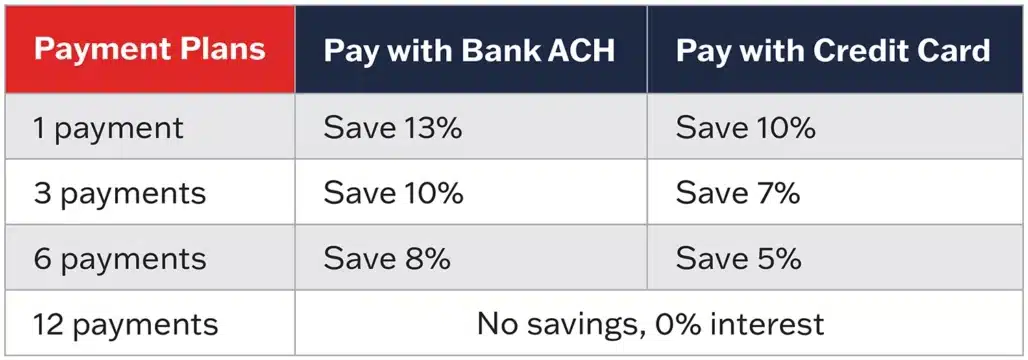
Payment Options & Savings
Convenience
It’s easy to view, store, and pay your bills in your AblePay member portal.
Advocacy
Understanding medical bills can be confusing. The AblePay team is available to support their members. If there is an issue with a bill, we will contact the provider’s billing office on your behalf to help get it resolved.
How does AblePay work?
Step 1: Enroll
Enroll at AblePayHealth.com/GlencoeWeb
Step 2: Show your AblePay card
Receive your AblePay card in the mail and show it with your primary insurance at your next medical visit.
Step 3: Billing Processing
The charge will be processed by your primary health insurance first. You will still receive you EOB (Explanation of Benefits). The portion you are responsible for paying will be sent to AblePay.
Step 4: Finalize Payment
When your bill is ready, AblePay will notify you via email and text to visit your AblePay member portal, giving you 5 days to make changes to your payment terms or payment method.
NEED HELP? CONTACT ABLEPAY:
Customer Service Phone: 484-292-4000
Customer Service Email: [email protected]